
Skip to content
Back to selected work
Live demo · Stripe test mode
KROMA logo

KROMA

An order-ahead coffee shop built end to end — a live storefront with Stripe checkout, and a real back of house: kitchen board, service day and numbers.

KROMA storefront hero

A fictional specialty coffee shop built as a complete order-ahead system, not a mockup. Customers browse a live daily menu, customise a drink, pay through Stripe and track the order; staff work that same order on a kitchen board, run a service day that closes with a cash count, and read the shop's numbers — while prices, stock, payment state and permissions are decided in Postgres, not trusted from the browser.

// Data Layer

Postgres-first logic

Pricing, stock, permissions and reports live in SQL functions guarded by Row Level Security.

// Payments

Pay-before-order

A card order is created only after Stripe confirms payment; failures are refunded.

// Staff Floor

Realtime kitchen board

Supabase Realtime on orders, with a 30-second polling fallback.

// Verification

Tested at two layers

node:test for app logic, plus SQL tests that run inside a rolled-back transaction.

// overview

What KROMA is

KROMA is a fictional specialty coffee shop built as a complete, production-shaped web application. A customer browses a live daily menu, customises a drink, pays by card through Stripe or at the bar, and tracks the order; staff work that same order on a kitchen board and manage stock, the menu, refunds and the end-of-day cash count from the same app. It's a portfolio project — the shop is fictional and payments run in Stripe test mode — but the flow behind it is real.

Every order is priced, stocked and permission-checked in Postgres, so the storefront, the kitchen board and the day report all read the same order record.

// 01. Strategic Context

Why KROMA is built this way

01 // Problem

A Checkout Button Isn't a Shop

Order-ahead demos often end at an Order button: a static menu and nothing behind it. What separates a working system from a mockup is everything those demos skip — stock that runs out mid-morning, payment state that has to be verified on the server, and a second interface for the people actually making the order.

Key dynamic: Two interfaces, one order
02 // Solution

One Order Record, Two Interfaces

KROMA is built as a two-sided system. The customer's order page and the staff's kitchen board read and advance the same order record. Postgres functions price each order, decrement stock and decide who may do what; the Next.js app calls them.

Key dynamic: Rules live next to the data
03 // Outcome

A Shop That Runs Its Own Day

A daily Vercel Cron job opens the service day, and staff close it by counting the drawer against a generated report. The demo stays safe to put in front of strangers: card payments run in Stripe test mode, and the staff PIN is a real write-access credential that is not published.

Key dynamic: Cron-opened day, counted close
// architectural tenet
“The browser proposes; Postgres decides. The client sends item IDs, quantities and modifier names — every price, stock change and permission check is resolved in the database.”
— Architectural Tenet
// 02. Product Tour

See KROMA in action

A walkthrough of the customer storefront and the staff floor — what each part does and how it feels to use it

Customer Side

What a guest or member meets, from browsing the menu to collecting the order

01Storefront

Live Menu Storefront

A live daily menu presented as an editorial list rather than a card grid. Stock and prices come straight from Postgres, so a batch that sells out shows as gone within the minute.
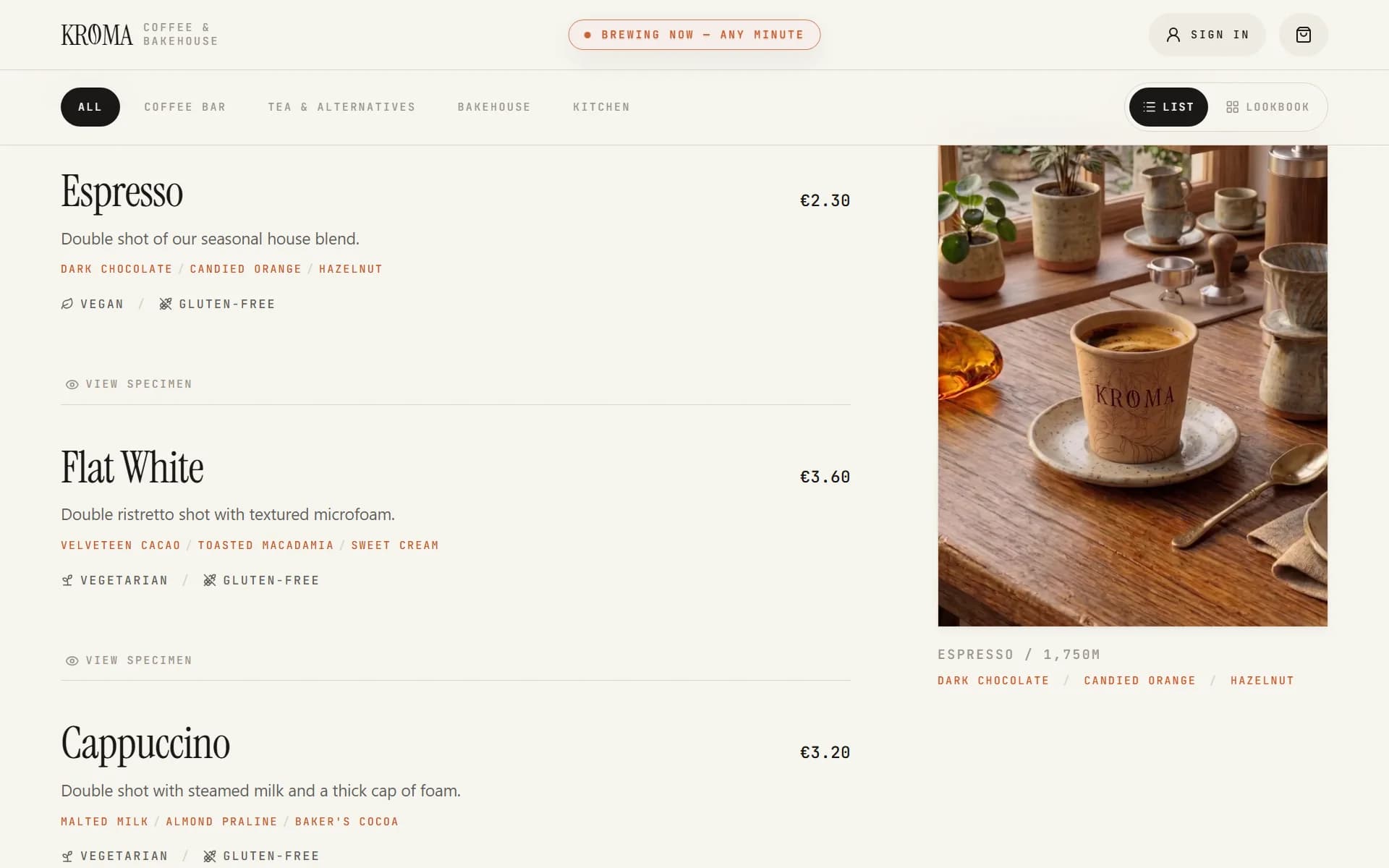
Screenshot of the KROMA storefront showing the editorial menu list with its sticky preview panel
  • Live Daily Menu: Items, prices and per-item stock are read from Postgres and revalidate every 30 seconds. If the query returns nothing, the storefront falls back to a local menu.json snapshot.
  • WebGL Depth-Map Hero: A fragment shader displaces the hero photo along a grayscale depth map as the cursor moves. It falls back to a still image with no WebGL, on load failure, or with reduced motion.
  • Editorial Menu List: Full-width, hairline-divided rows with a sticky preview panel on desktop that swaps photography on hover or keyboard focus.
  • Category Filtering: Pill navigation whose active fill slides between categories instead of cutting.
  • Item Customization: A slide-over sheet for modifiers and variants, with the price recalculating as you choose.
  • Stock States: A depleted item reads “Gone for today”; five or fewer left reads “Only N left”.
Next.js 16SupabaseFramer MotionWebGLRevalidate 30s
02Checkout & Tracking

Order, Pay & Track

Pay by card through Stripe Checkout or choose to pay at the bar, then follow the order on a shareable page. A card order only comes into existence once Stripe confirms the payment.

  • Guest or Account: Ordering works without an account. A signed-in customer's cart is stored in Postgres, and a guest cart is merged into it on sign-in.
  • Stripe Checkout: Card payments run in Stripe test mode. The session is priced from a server-side quote and expires after 30 minutes.
  • Pay at the Bar: A counter order is placed as pending; the barista records cash or card when marking it paid.
  • Dietary Check: Saved diets and allergens flag conflicting items in the cart before checkout.
  • Order Tracking: A shareable /order/[token] page shows the order moving from paid to brewing to ready, refreshing every 15 seconds. Before it reaches the bar, the customer can cancel it, and an online payment is refunded.
  • Ready Alert: A Web Push notification fires when the order is ready, with an email fallback when push isn't available.
  • Receipts: A printable receipt page with a barcode and VAT line, plus an emailed receipt through Resend when an address is available.
Stripe CheckoutStripe WebhooksWeb Push (VAPID)ResendServer Actions
03Accounts

Account & Punch Card

Email or Google sign-in unlocks a punch card, a one-tap “your usual”, order history and saved dietary preferences.

  • Sign-In: Email and password with a confirmation email and password reset, or Google OAuth.
  • Punch Card: Only drink categories earn a punch. A new account starts with 2 punches and a full card is 10. The balance is derived from order history rather than stored, so a cancelled or refunded order takes its punches with it.
  • Free Item: A full card redeems one unit of an item at checkout.
  • Your Usual: The item the customer has ordered most, with the modifiers from its latest order, ready to reorder.
  • Preferences: A display name plus a separate bar name called out over the pass, diets (Vegan, Vegetarian, Pescatarian, Gluten-Free) and allergens to avoid.
  • Order History: Past orders with a reorder button.
Supabase AuthGoogle OAuthRow Level SecurityDerived Balance

Staff Side

The back of house at /dashboard, behind a real account and a 4-digit PIN

4-Digit PIN

Two-Layer Staff Sign-In

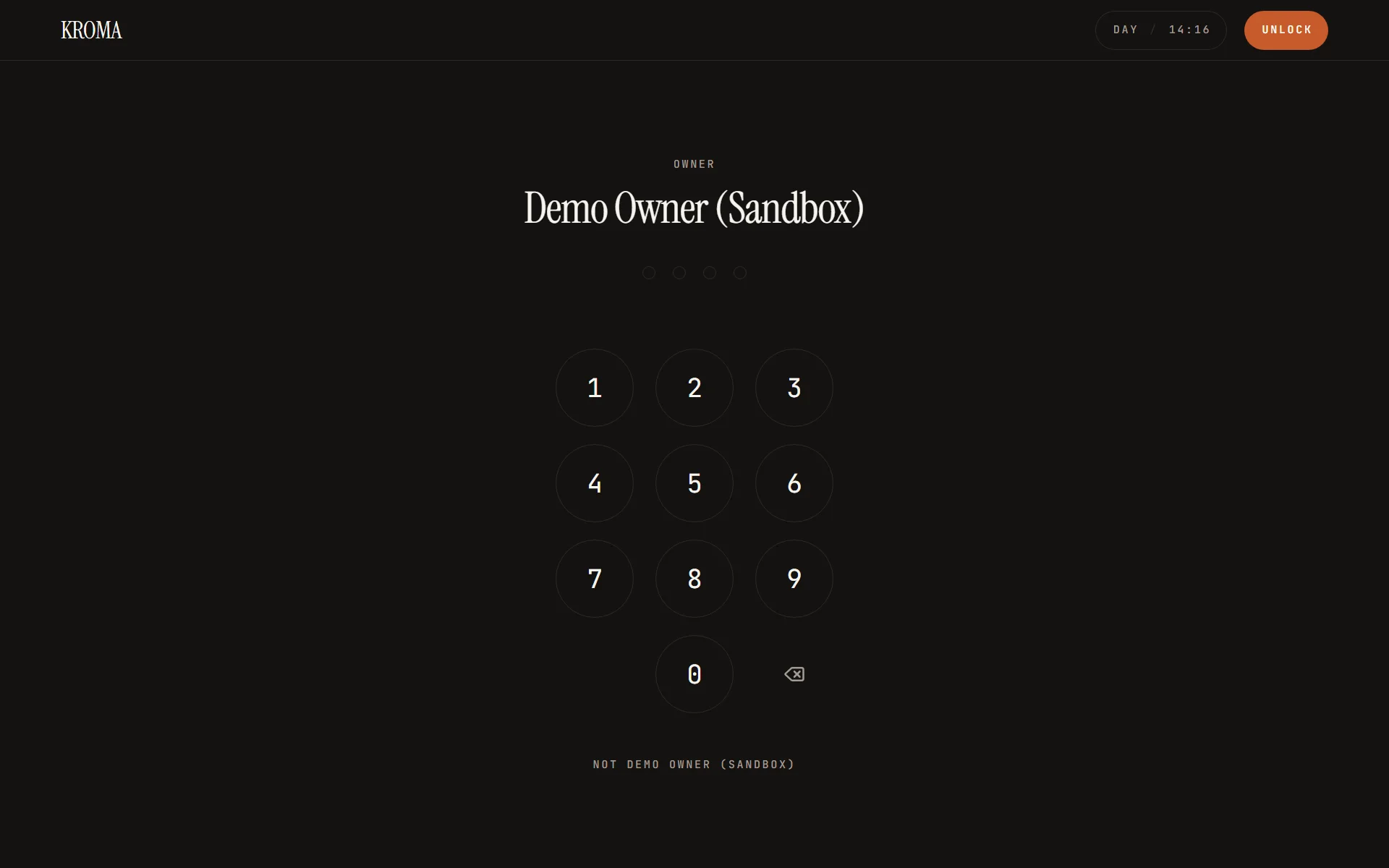
The iPad behind the bar holds a long-lived session so the board can render; a person unlocks the right to write with a 4-digit PIN. The PIN is checked only inside Postgres with pgcrypto, five wrong entries lock that person out for 15 minutes, and every unlock is logged.

Screenshot of the KROMA staff PIN pad on the dark kitchen display surface
04Kitchen Display

Order Board

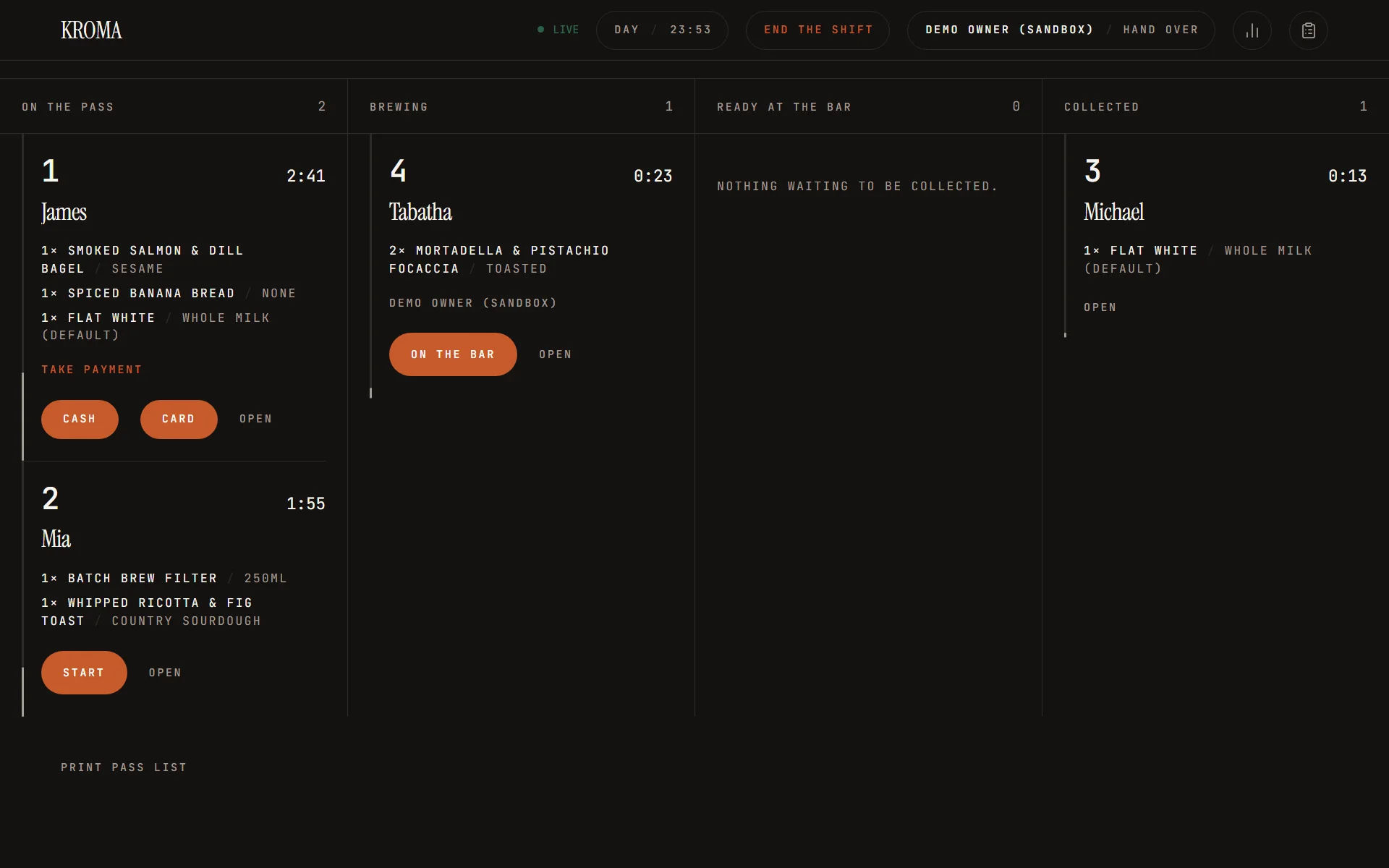
A dark, high-contrast board built for the line. Orders move through four lanes — On the pass, Brewing, Ready at the bar, Collected — and the customer's page follows along.

Screenshot of the KROMA kitchen board showing orders across the four lanes with their age indicators
  • Live Queue: Supabase Realtime on the orders table refetches the board. A connection pill shows live, reconnecting or offline, a 30-second poll covers gaps, and writes are disabled while offline.
  • Age Indicator: Each order shows a running timer and turns from fresh to warm at 5 minutes and late at 10.
  • New-Order Chime: A sound plays when a new order appears on the board, once the device has been armed by a tap.
  • Advance & Undo: One tap advances an order. Moving it one lane back is open to anyone within 90 seconds; after that only a manager or owner can.
  • Notes, Voids & Refunds: Anyone on shift can add a note. Managers and owners can void or refund, and an online order's Stripe refund is issued from the app.
  • Discounts & Comps: Managers and owners can apply a percent, a fixed amount or a full comp, with a required reason.
  • Installable: The board installs as a fullscreen, landscape PWA.
Supabase RealtimePostgres RPCsPWAFramer Motion
05Service Day

Open, Trade & Close

Trading is organised into days. Someone opens the shop with par-stock counts, a closed shop refuses orders, and a manager or owner closes it by counting the drawer against a generated report.

  • Open Service: Opening resets each item's stock to its par level, or to the counts entered on the open screen. Any role can open, and two devices tapping Open produce a single opening.
  • Closed Shop: While no day is open, placing an order raises “The bakehouse is closed.”
  • Ticket Numbers: Each day numbers its tickets from #001.
  • Tender: At the counter, the barista records whether an order was paid in cash or by card.
  • Cash Count: The close screen takes a count per denomination and shows the variance against expected cash: float plus cash takings minus cash refunds.
  • Close Guard: A day can't close while orders are still on the pass; the error lists their ticket numbers.
  • Day Report: Orders, takings, net and VAT; cash, card and online totals; discounted, voided, refunded and binned amounts; and what's left in stock.
  • VAT: Prices stay VAT-inclusive. VAT is extracted per category (11% on everything sold today) and snapshotted onto each order line.
Postgres RPCsService DaysVATVercel Cron
06Analytics

Numbers & Ledger

A manager-and-owner view of the shop, aggregated in Postgres rather than in the browser, so the permission check sits where the money is summed.

  • Earnings: Takings over a chosen date window, filterable by category.
  • Behind the Bar: Per person: orders started, voided and refunded, with timings taken from the same order rows.
  • Ledger: The audit trail, filtered and paged: unlocks, order moves, discounts, shift boundaries, opening and closing, and menu edits.
  • Permission Gate: Each aggregate re-reads the caller's role in the database and refuses anyone below manager.
Postgres RPCsAudit LogRole Gating
Menu Admin

Edit the Live Menu

Managers and owners edit the menu from the dashboard: reorder items, open the item sheet with its modifier editor, manage categories and delete items. Every write goes through a permission-checked function, and past orders keep their item name and price.

// 03. Architecture & Topology

Serverless Full-Stack Architecture

A Next.js app on Vercel in front of a Supabase project, with Stripe, cron and push wired in through server routes

topology.ascii
    [ Browser · Customer & Staff PWAs ]                           [ Vercel Cron ]
      │                           │                                     │
      │                           │ HTTPS                               │ Bearer secret
      │                           ▼                                   ▼
      │                    ┌────────────────────────────────────────────────────────────────┐
      │                    │                Next.js 16 · React 19  (Vercel)                 │
      │                    ├────────────────────────────────────────────────────────────────┤
      │                    │ • Server Components & Server Actions                           │
      │                    │ • Route Handlers: Stripe webhook · cron · auth callbacks       │
      │                    │ • Signed cookie that unlocks staff writes                      │
      │                    └───────────┬─────────────────────┬───────────────────┬──────────┘
      │                                │ RPC                 │ API               │ Push · email
      │                                ▼                   ▼                  ▼
      │                     ┌──────────────────────┐  ┌───────────────┐  ┌───────────────────┐
      └─ RPC · Realtime ──►│ Supabase             │  │ Stripe        │  │ Notifications     │
                            ├──────────────────────┤  ├───────────────┤  ├───────────────────┤
                            │ • Postgres + RLS     │  │ • Checkout    │  │ • Web Push (VAPID)│
                            │ • Security-definer   │  │ • Refunds     │  │ • Resend email    │
                            │   RPCs               │  │ • Webhooks    │  └───────────────────┘
                            │ • Auth               │  └───────────────┘
                            │ • Realtime           │
                            └──────────────────────┘

Technical Decision & Rationale Matrix

Where each responsibility lives, and why it sits there

Layer & ScopeTechnology ChoiceKey Capabilities & Rationale
Frontend
App Framework
Next.js 16 (App Router) + React 19

Server components, server actions, one client boundary

The storefront is a server component that fetches the menu and revalidates every 30 seconds; a single client boundary holds filter and cart state. Mutations are server actions, and route handlers cover the Stripe webhook, the cron job and auth callbacks.
Persistence
Database & Logic
Supabase Postgres

Business rules as security-definer RPCs, RLS on customer data

Pricing, stock, ticket numbers, permissions, refunds and reports live in SQL functions managed as versioned migrations, so the storefront, the board and the cron job all go through the same rules.
Auth
Identity
Supabase Auth + staff table

Email/Google for customers; station session plus PIN for staff

Customers sign in with Supabase Auth. Staff work through a station that can read, while a per-person PIN unlocks writes, so every change is attributed to someone.
Commerce
Payments
Stripe Checkout + webhooks

Pay first, then the order exists

The Checkout Session is priced from a database quote. The order is created only after payment, from the webhook or the return page, and refunded if it can't be placed.
Real-Time
Live Updates
Supabase Realtime

Subscribe thin, fetch fat

The kitchen board listens for changes on the orders table and refetches through one RPC, with a 30-second poll as a fallback. Customer order pages poll every 15 seconds.
Operations
Scheduled Jobs
Vercel Cron

One authenticated daily route at 03:00 UTC

The job releases expired online orders, opens the service day through the same RPC a barista uses, and deletes stale push subscriptions.
Messaging
Notifications
Web Push (VAPID) + Resend

Push first, email as the fallback

Ready alerts go out as Web Push through a minimal service worker; if no push is delivered, an email is sent when an address exists. Receipts are emailed through Resend.
Design
Interface
Tailwind CSS v4 + Framer Motion + WebGL

Hairline rules, mono labels, reduced-motion fallbacks

Structure comes from single-pixel rules rather than cards or shadows. Motion tokens are shared, and every ambient animation degrades to a still, usable state under reduced motion.
// 04. Under the Hood

Built to Keep Money, Stock & Permissions Correct

Four decisions that hold the system together

// 01Payments & Orders

Pay Before the Order Exists

A card order is created only from a Stripe session that has already been paid, so an unpaid card order never reaches the orders table.

  • Priced in the Database: The pre-payment quote and the post-payment insert share one line resolver. The client sends item IDs, quantities and modifier names; every price is read from menu_items.
  • Webhook and Return Page: checkout.session.completed and the confirm redirect both call one handler that is idempotent on stripe_session_id.
  • Refund on Failure: If a paid session can't become an order, it is refunded automatically with a per-session idempotency key.
  • Signature Checked: The webhook rejects any request without a valid Stripe signature.
  • Stripe
  • Webhooks
  • Idempotency
  • Postgres RPC
// 02Data & Security

Postgres as the Authority

Row Level Security and security-definer functions put the rules next to the data, so no client path can skip them.

  • Scoped Customer Data: RLS policies limit customers to their own carts, profiles, favourites and orders.
  • Guest Orders by Token: Guests have no policy on orders. An unguessable token buys exactly one order through order_by_token(), which omits the token, user ID and Stripe columns.
  • Snapshots: Item name, price, VAT rate and punch eligibility are copied onto each order line, so later menu edits don't rewrite history.
  • Derived Balances: The punch-card balance is a query over order history, not a stored counter.
  • Tested in SQL: SQL tests exercise the real schema inside a transaction that is rolled back, while node:test covers the app-side logic.
  • Row Level Security
  • security definer
  • Supabase
  • node:test
// 03Staff & Permissions

Roles, PINs & an Audit Trail

Owner, manager and staff roles are enforced by one staff_can() function that the RLS policies and every write RPC call.

  • One Permission Function: The TypeScript mirror exists only to hide buttons; the database is the boundary.
  • Actor Re-read: Every write RPC reads the actor from the staff table, so deactivating someone stops their next write even if their cookie is still valid.
  • PIN Lockout: Five failed PINs lock a person for 15 minutes and write a staff.locked event.
  • Owner Claim: The first signed-in account to call claim_owner() becomes owner and the door closes behind it — no seeded credential.
  • Audit Log: Actions write to a staff_events log that managers and owners can read.
  • staff_can()
  • pgcrypto
  • Lockout
  • Audit Log
// 04Operations

A Self-Running Service Day

A daily job and a race-safe opening keep the shop trading without a manual step.

  • Daily Cron: vercel.ts schedules /api/cron/release-holds at 03:00 UTC, authenticated with a CRON_SECRET bearer token.
  • What It Does: It releases expired online orders, opens the day through open_service (acting as the earliest-created active staff person), and deletes push subscriptions older than 24 hours.
  • Race-Safe Opening: Opening is an insert on the day's primary key, so concurrent opens leave one day and never reset a morning's stock.
  • Serialised Stock: Menu rows are locked with for update when stock is decremented, so two buyers reaching for the last item queue up.
  • Numbered Tickets: Ticket numbers come from the day's row inside the same order-creation function that decrements stock.
  • Vercel Cron
  • open_service
  • Row Locks
  • Service Days
// 05. Challenges & Hurdles

Engineering Hurdles & Solutions

Where real money, real stock and real staff made the easy approach wrong

// 01Concurrency & Money

Two People, One Last Bun

The Obstacle

An online order no longer holds stock while the customer is at Stripe, so two people can pay for the last item. The quote refuses an item that is already gone, but it can't stop that race.

The Resolution

The order-creation function locks the menu rows with for update before decrementing stock. The loser's insert raises and the payment handler refunds them. Retries are safe: orders are unique per stripe_session_id, the webhook and the return page share one handler, and the refund carries a per-session idempotency key.

Impact: A payment becomes at most one order or is refunded. The trade-off, accepted deliberately, is that the loser pays and is refunded rather than being blocked earlier.

  • Row Locks
  • Idempotency
  • Auto-Refund
  • Stripe
// 02Data Transport

A Cart That Fits in Stripe Metadata

The Obstacle

The order is created after payment by code that only sees the Checkout Session, so the cart has to travel with it — and Stripe metadata values are short.

The Resolution

packItems() serialises the cart to JSON and splits it into 500-character items_N keys, capped at 45 to leave room for the name, notes and IDs. unpackItems() reassembles it, and the database rebuilds and re-prices the order from item IDs rather than trusting the metadata.

Impact: No draft-order row exists before payment, so an abandoned checkout leaves nothing behind. Orders are capped at 50 lines.

  • Stripe Metadata
  • Chunking
  • Server Actions
// 03Security & Identity

The iPad That Never Logs Out

The Obstacle

The device behind the bar stays signed in all day, so its session can't say who did what — and a stolen iPad shouldn't be able to refund anyone.

The Resolution

A station holds the long-lived session so the board can read, but a database constraint forbids a station from having a PIN, so no actor session can ever be minted for it. People unlock writes with a 4-digit PIN checked in Postgres, and every RPC re-reads the actor. Staff policies that queried the staff table recursed, so a security-definer is_staff() helper breaks the cycle.

Impact: Writes are attributed to a person, deactivation takes effect on the next write, and being able to see the board never confers the ability to change it.

  • PIN + pgcrypto
  • Lockout
  • security definer
  • RLS
// 06. Technology Stack

What it's built with

Layer-by-layer breakdown of the frameworks, services and tooling

Frontend & UI
  • Next.js 16
  • React 19
  • Tailwind CSS v4
  • shadcn/ui
  • Base UI
  • Framer Motion
Backend & API
  • Supabase Postgres
  • Stripe Checkout
  • Stripe Webhooks
Real-Time & WSS
  • Supabase Realtime
Background Queues
  • Vercel Cron
Storage & Media
  • ImageKit
Auth & Security
  • Supabase Auth
  • Row Level Security
  • pgcrypto
Communications
  • Web Push (VAPID)
  • Resend
DevOps & Deploy
  • Vercel
  • pnpm
// 07. Local Run & Evaluation

Try It Live & Local Reproduction

The storefront at kroma.lenardtunya.com opens itself every morning, so there's always a live menu to order from. Card payments run in Stripe test mode — use 4242 4242 4242 4242, any future expiry and any CVC.

The staff dashboard is real, which is exactly why its PIN isn't published: it's a write-access credential against live demo data. To see it, run the project locally — the seed ships with its own throwaway PIN — or get in touch for an interactive walkthrough.

local-setup.sh
# 1. Clone and install
git clone https://github.com/JustTunya/kroma.git
cd kroma
pnpm install

# 2. Start local Postgres + Auth, seeded from supabase/seed.sql
supabase start

# 3. Configure environment variables (see README for each one)
cp .env.local.example .env.local

# 4. Start the app
pnpm dev
# Storefront: http://localhost:3000
# Dashboard:  http://localhost:3000/dashboard

# 5. Unlock the staff dashboard (local seed only)
#    a. Sign up at /auth/sign-up, confirm via the local Inbucket mail UI
#       (`supabase status` prints its URL, usually http://localhost:54324)
#    b. Link that account to the seeded staff row:
#       update staff set user_id = (select id from auth.users
#         where email = 'you@example.com') where display_name = 'Demo Owner';
#    c. Sign in, open /dashboard, enter the seeded PIN 1234, then open the shop

Evaluation Disclosures & Simulation Details

  • Simulated Shop: KROMA is fictional. Card payments run in Stripe test mode with no real charges, and the roasting and sourcing copy on the storefront is flavour text, not a real supply chain.
  • Real Web Push, No SMS: Ready alerts are real VAPID Web Push notifications, with an email fallback. There is no SMS or phone-number path.
  • PolyForm Noncommercial License: The source is public for reading, study and personal or educational use under PolyForm Noncommercial 1.0.0. Commercial use — including running it as an actual shop — needs a separate licence.

Explore KROMA in Action

Publicly accessible for technical evaluation, code review, and architectural inspection.