Skip to content
Back to selected work
Live production
crwsync logo

crwsync

Real-time collaborative workspace fusing Kanban task boards, live team messaging, and file storage in a high-availability distributed monorepo.

crwsync workspace dashboard

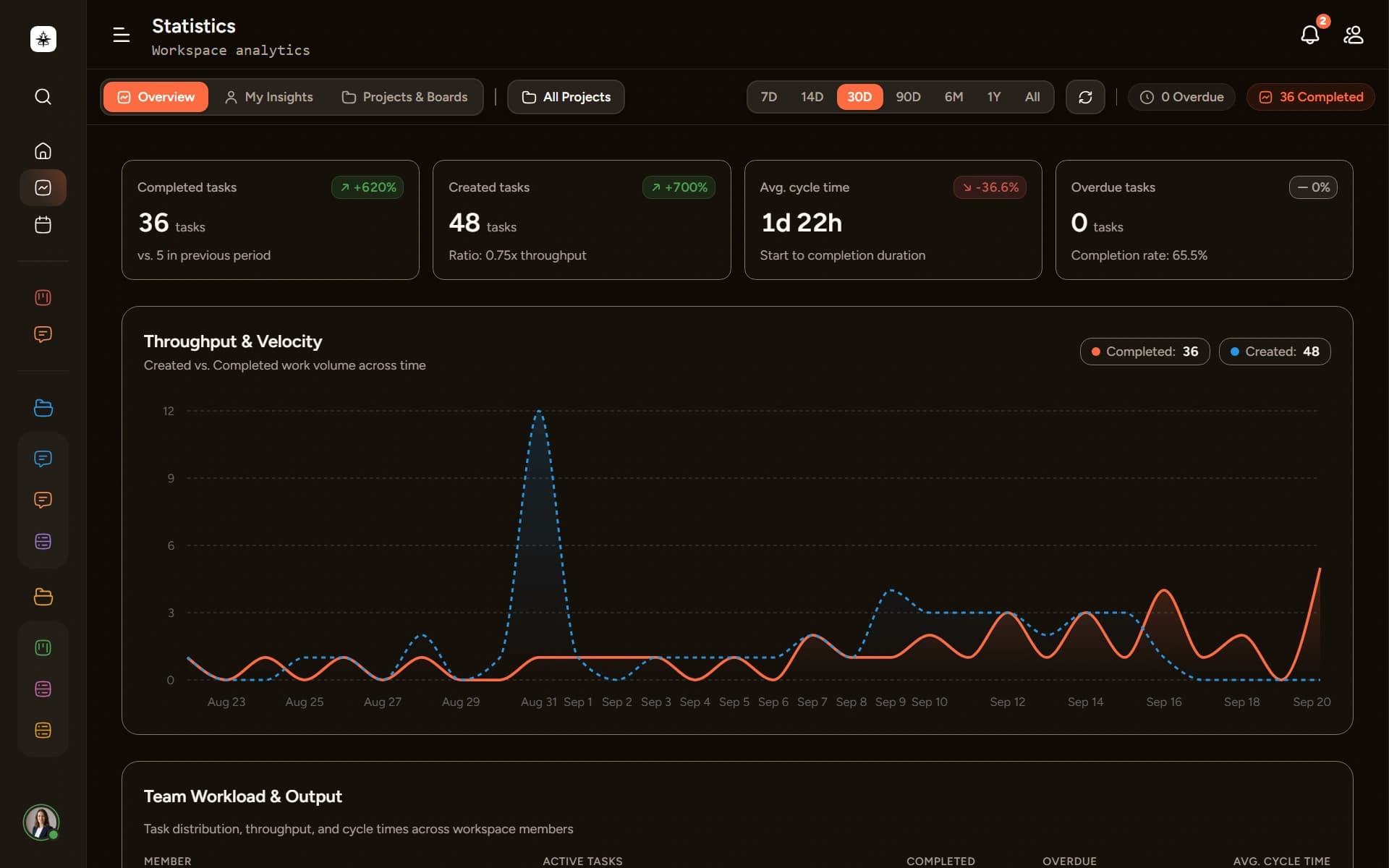
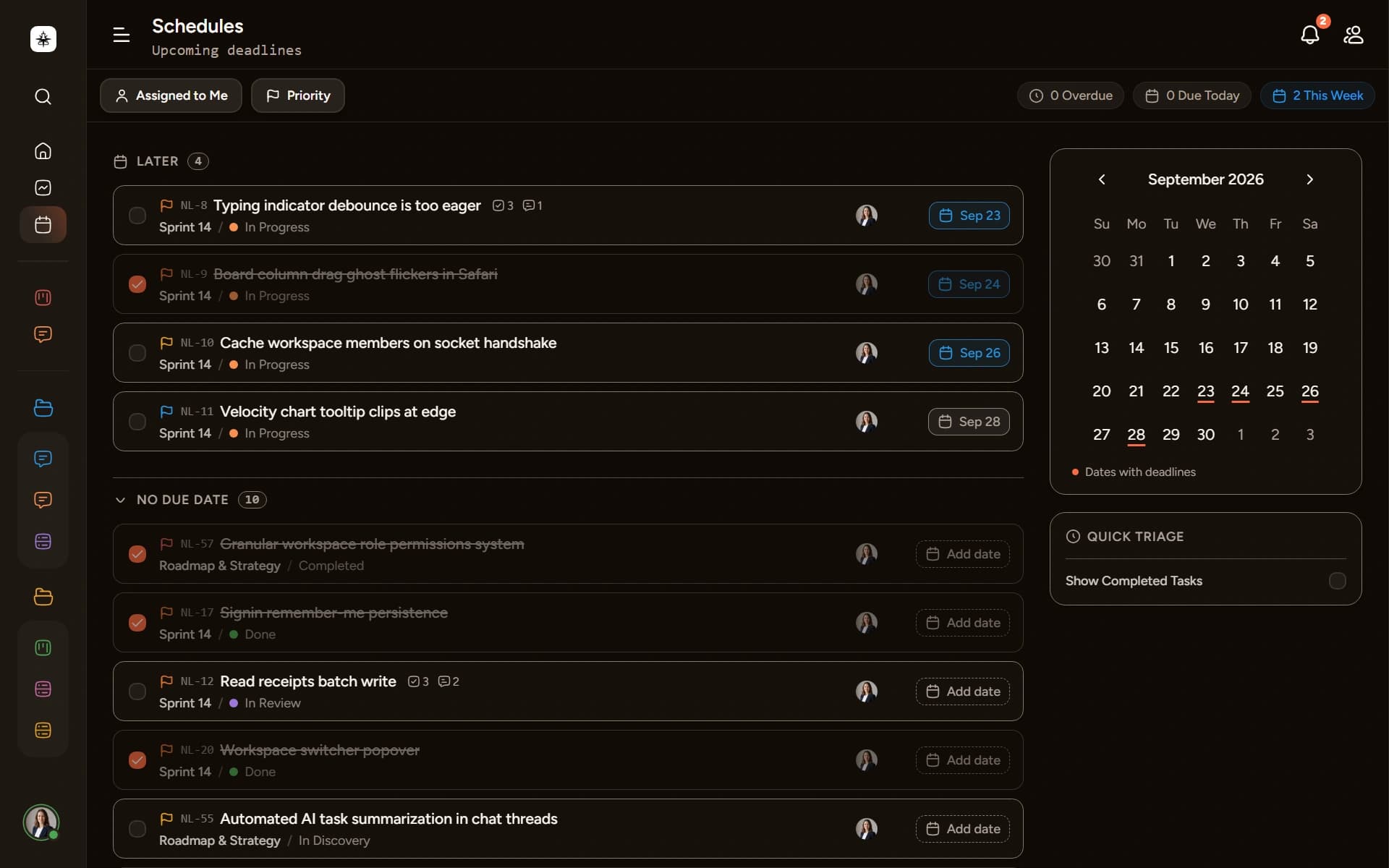
A distributed, real-time collaborative workspace platform engineered to eliminate enterprise context-switching. By unifying Kanban task tracking, low-latency team communication, and centralized file storage inside a decoupled Turborepo monorepo, crwsync synchronizes state instantaneously across organizations and distributed environments — with a global Cmd+K search reaching across tasks, messages, and files.

// Architecture

Distributed Turborepo

3 decoupled apps (@crwsync/backend, @crwsync/dash, @crwsync/web).

// Real-Time Engine

Socket.IO + Redis 7

Horizontal WebSocket scaling with Redis Pub/Sub adapter.

// Backend & DB

NestJS 11 + Prisma 7

PostgreSQL 16 persistence with workspace-scoped RBAC guards.

// Infrastructure

Docker Swarm

Containerized multi-service orchestration with health checks.

// overview

What crwsync is

crwsync fuses Kanban-style task boards with live team messaging into a single interface, so a team drags a card between columns and sees a teammate's chat message land in the same pane, in real time — with shared files, task comments, and checklists just as close at hand. It's built as an enterprise-grade Turborepo monorepo — a NestJS API, a Next.js dashboard, and a public web portal — decoupled into containers and orchestrated for high availability.

A dual-layer role management system adapts the workspace to a team's actual hierarchy and access requirements, rather than a single flat permission model.

// 01. Strategic Context

Why crwsync is built this way

01 // Problem

Tool Fragmentation & Context Switching

Modern engineering teams routinely navigate between 9 and 15 disparate applications daily. Toggling between isolated Kanban task boards, issue trackers, and standalone chat channels fragments cognitive focus, causes data drift, and creates communication friction that slows team execution velocity.

Key dynamic: 9–15 fragmented apps per team
02 // Solution

Co-Located Task Boards & Live Messaging

crwsync unifies execution by integrating drag-and-drop Kanban task boards directly with real-time room and direct messaging inside a single viewport. Built on a modular Turborepo monorepo, it pairs optimistic UI state with WebSocket broadcasts and workspace role-based permissions.

Key dynamic: Single-pane collaborative canvas
03 // Outcome

Sub-100ms Latency & Decoupled Architecture

By separating synchronous PostgreSQL database transactions from ephemeral live broadcasts via Redis Pub/Sub, the system delivers sub-100ms sync latency across distributed clients while offloading heavy background workloads like emails to asynchronous BullMQ job queues.

Key dynamic: Sub-100ms event propagation
// architectural tenet
“By decoupling live WebSocket broadcasts from persistent relational database transactions, crwsync delivers sub-100ms synchronization latency while preserving strict ACID guarantees.”
— Architectural Tenet
// 02. Product Tour

See crwsync in action

A client-facing walkthrough of every module — what it does and how it feels to use it

Global Modules

Three workspace-wide views available from the top navigation bar

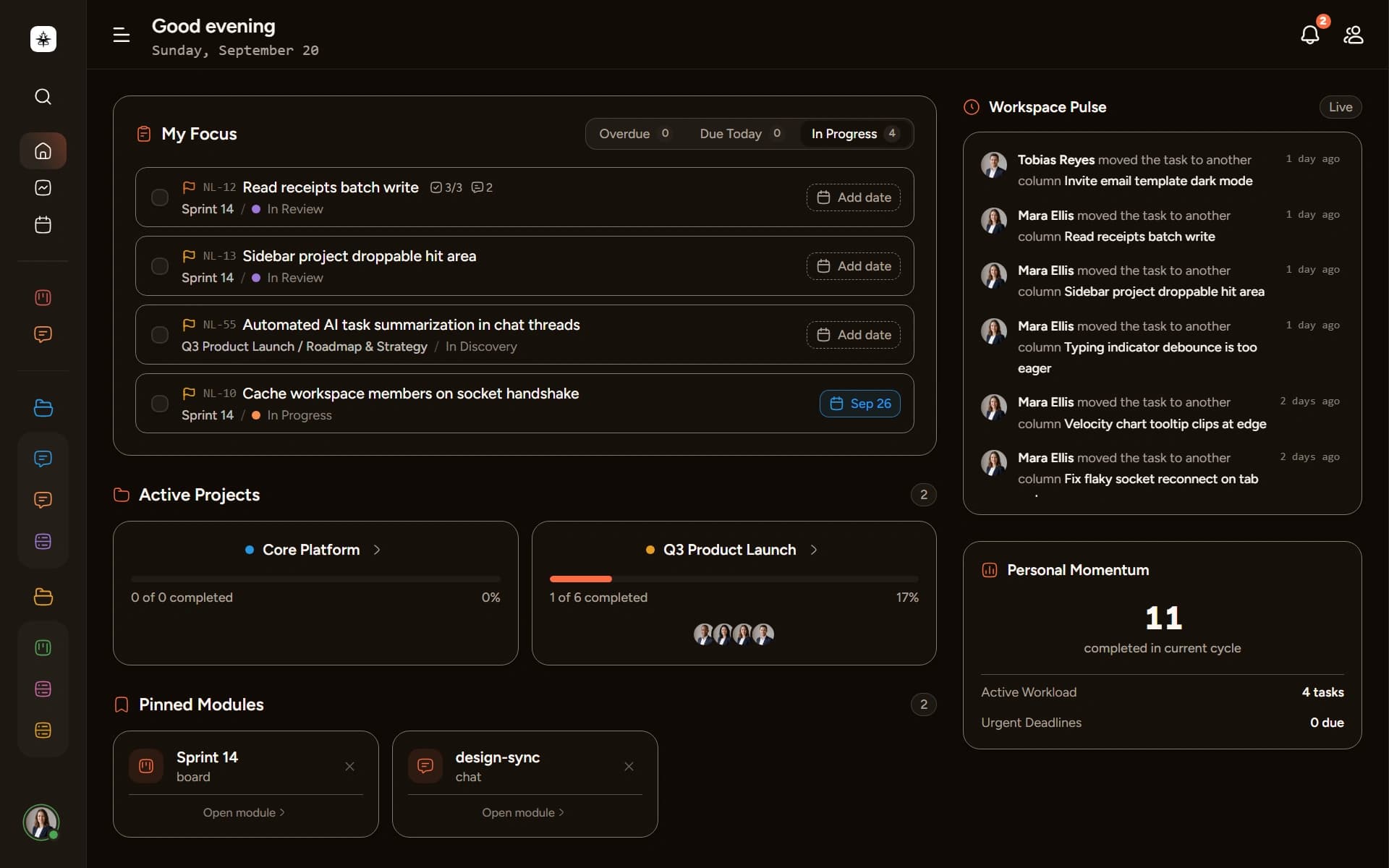
Home Dashboard screenshot

Home Dashboard

The workspace landing hub — recent activity feed, pinned projects, pending tasks, and a live team presence snapshot at a glance.

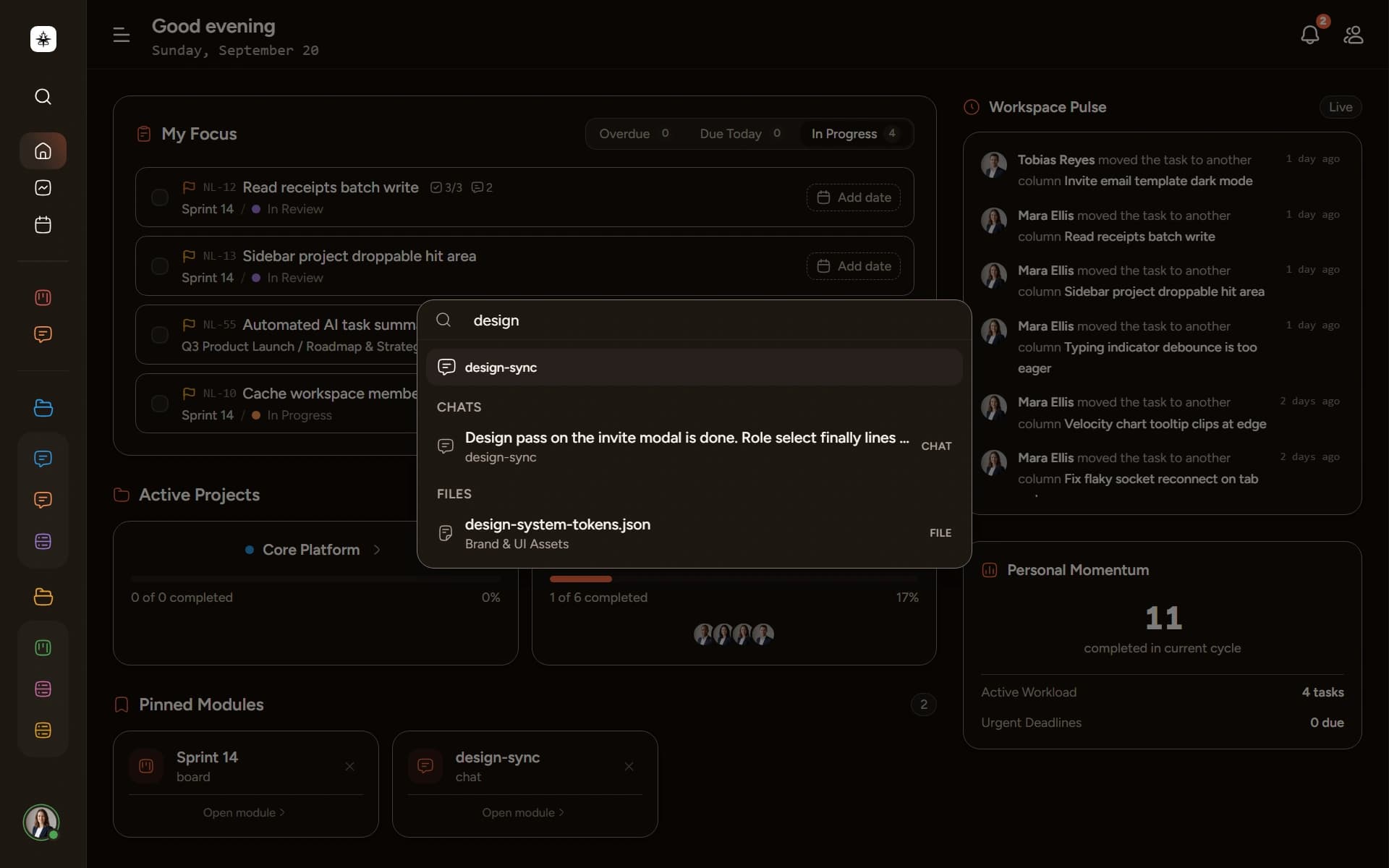
⌘KGlobal Omni-Search

Global Omni-Search

Press Cmd+K (or Ctrl+K) from anywhere in the workspace to open a unified search modal. Tasks, messages, files, and members — all searchable in one place, with instant fuzzy results as you type.

Screenshot of the crwsync Cmd+K omni-search modal open, showing search results across tasks and messages
02Task Management

Task Board

A drag-and-drop Kanban board where your team moves work forward together — in real time. Drop a card into a new column and every teammate sees it shift instantly, no refresh needed.

  • Drag & Drop Columns: Move tasks between workflow stages with smooth drag-and-drop — reorders persist across all teammates instantly.
  • Task Detail Panel: Open any task for a full editing surface: rich-text description, checklists with progress, due dates, and priority labels.
  • Subtask Checklists: Break work into steps with inline checklists. A progress badge tracks completion at a glance from the board view.
  • Comments & @Mentions: Threaded comments on every task with @mention notifications, keeping context attached to the work itself.
  • Attachments & Previews: Drag files directly onto a task or paste images. Thumbnails and a lightbox viewer load inline in the detail panel.
  • Filters, Views & Activity: Filter by assignee, priority, or label. Toggle between Kanban, List, and Table views. Every change is logged in a per-task activity trail.
Socket.IO@dnd-kitTanStack QueryTipTapFractional Indexing
03Team Communication

Chat Room

A full live-messaging layer built into the same viewport as your tasks. Project channels, direct messages, file sharing, and emoji reactions — all broadcasting in under 100ms.

  • Project Channels: Each project gets its own dedicated channel. Context stays co-located with the board, not in a separate app.
  • Direct Messages: Private 1-on-1 conversations with any workspace member — separate inbox, same real-time delivery.
  • Typing Indicators: See when teammates are composing a reply — ephemeral signals that make async feel live.
  • Online Presence: Live online/away status next to every member avatar, across the sidebar and message threads.
  • Emoji Reactions: React to any message with emoji. Tally counters update live for everyone in the room.
  • File & Image Sharing: Drag attachments into any message. Images open in a lightbox. Unread badges and notification alerts keep the team in sync.
Redis 7NestJS GatewaySocket.IOPresence EnginePub/Sub
04File Storage

Team Drive

A shared workspace file library alongside your boards and chat — upload, preview, and organise team assets without leaving the app. Files attached to tasks and messages live here too.

  • Workspace File Library: Every file uploaded to the workspace — task attachments, chat media, standalone uploads — surfaces in one organised drive.
  • Grid & List Toggle: Switch between a visual grid of thumbnails and a compact list view with metadata columns.
  • Drag-and-Drop Upload: Drop files anywhere in the drive panel to upload. Progress indicators and instant thumbnail generation on completion.
  • Preview & Download: Click any file to open a full preview modal with image lightbox. Download with one click.
  • Workspace-Scoped Access: Files are private to each workspace. Role-based access ensures only authorised members can view or download sensitive assets.
MinIOS3-CompatiblePresigned UploadsCloudflare R2
// 03. Architecture & Topology

Distributed Monorepo Architecture

Decoupled containers orchestrated for high availability and low-latency synchronization

topology.ascii
                      [ Client Browser / Mobile Web ]
                                     │
                                     │ HTTPS / WSS (TLS Termination)
                                     ▼
         ┌───────────────────────────────────────────────────────────┐
         │           Reverse Proxy & Edge Ingress (NGINX)            │
         │            Routes *.crwsync.xyz with SSL & Gzip           │
         └──────────────┬─────────────────────────────┬──────────────┘
                        │                             │
        ┌───────────────┴───────────────┐             │
        ▼                             ▼            ▼
    ┌───────────────────────┐   ┌───────────────────────┐   ┌───────────────────────────┐
    │     @crwsync/web      │   │     @crwsync/dash     │   │     @crwsync/backend      │
    │   (Next.js 16 SSR)    │   │   (Next.js 16 SPA)    │   │        (NestJS 11)        │
    │   crwsync.xyz:3000    │   │ dash.crwsync.xyz:3001 │   │    api.crwsync.xyz:4000   │
    │   • Marketing Portal  │   │   • Kanban Viewport   │   │  • REST API Controllers   │
    │   • Auth Redirection  │   │   • Live Chat Panels  │   │  • Socket.IO Gateways     │
    │   • Static Docs/Legal │   │   • Zustand State     │   │  • Dual-Layer RBAC Guards │
    └───────────────────────┘   └───────────┬───────────┘   │  • BullMQ Queue Producers │
                                            │               └─────────────┬─────────────┘
                                            │ REST / WSS Events           │
                                            └─────────────────────────────┘
                                                          │
                           ┌──────────────────────────────┴──────────────────────────────┐
                           │                                                             │
                           ▼                                                           ▼
           ┌───────────────────────────────┐                             ┌───────────────────────────────┐
           │     PostgreSQL Relational     │                             │        Redis 7 In-Memory      │
           │       Database Instance       │                             │      Pub/Sub & Queue Broker   │
           ├───────────────────────────────┤                             ├───────────────────────────────┤
           │ • Prisma 7 ORM Data Modeling  │                             │ • Socket.IO Redis Adapter     │
           │ • Relational Integrity & ACID │                             │ • BullMQ Worker Queue State   │
           │ • Scoped Multi-Tenant Tables  │                             │ • Ephemeral User Presence     │
           │ • Indexed Foreign Keys & DTOs │                             │ • Real-time Typing Streams    │
           └───────────────────────────────┘                             └───────────────────────────────┘
                           ▲                                                           ▲
                           │                                                             │
                           └──────────────────────────────┬──────────────────────────────┘
                                                          │
                                                          ▼
                           ┌─────────────────────────────────────────────────────────────┐
                           │               Docker Swarm Orchestration Engine             │
                           │   • Stack Compose Deployment (`stack.yml`)                  │
                           │   • Isolated Virtual Overlay Network (`crwsync_net`)        │
                           │   • Automated Container Health Checks & Zero-Downtime Rolls │
                           │   • Memory Hard Limits & Restart Policies (512MB/service)   │
                           └─────────────────────────────────────────────────────────────┘

Technical Decision & Rationale Matrix

Core architectural trade-offs driving stability, developer velocity, and horizontal scalability

Layer & ScopeTechnology ChoiceKey Capabilities & Rationale
Build & Dev
Monorepo Engine
Turborepo + pnpm workspaces

Atomic commits, shared configs, cached builds

Enables unified TypeScript configs, shared ESLint presets, and instant task pipeline caching across @crwsync/backend, @crwsync/dash, and @crwsync/web while minimizing dependency bloat via strict symlink isolation.
Core API
Server Framework
NestJS 11 (TypeScript)

Strict modular DI, typed DTOs, custom RBAC guards

Enterprise architecture with declarative dependency injection, class-validator input sanitization, and composable execution guards that enforce dual-layer RBAC across both REST controllers and Socket.IO gateways.
Frontend
Client Framework
Next.js 16 + React 19

Server components, Radix UI primitives, Tailwind CSS v4

Combines blazing-fast server-rendered landing pages (@crwsync/web) with a highly interactive, accessible, client-side stateful application shell (@crwsync/dash) optimized for sub-100ms UI feedback.
Real-Time
Real-Time Layer
Socket.IO + Redis 7 Pub/Sub

Horizontal WebSocket scaling across Swarm replicas

Separates ephemeral real-time socket broadcasts from relational database transactions. The Redis adapter distributes room broadcasts across multiple NestJS replicas with zero packet loss.
Background
Async Processing
BullMQ + Redis 7

Decoupled transactional job queues with retry backoff

Isolates heavy background jobs (Handlebars email rendering, invite token dispatch, digest generation) from HTTP threads with configurable exponential retry policies and dead-letter queues.
Persistence
Database
PostgreSQL 16 + Prisma 7

@prisma/adapter-pg driver, relational integrity

Guarantees strict ACID transactions for multi-tenant organizations, projects, boards, and task columns. Uses the high-performance @prisma/adapter-pg driver with automated schema migrations.
Storage
Object Storage
MinIO (dev) + S3-compatible (prod)

Presigned uploads, workspace-scoped access gating

Powers avatars, task attachments, chat media, and the dedicated Files workspace module. The public avatar route stays open while workspace file routes remain auth-gated, since attachments are private to a workspace.
DevOps
Orchestration
Docker Swarm

Declarative stack.yml, rolling zero-downtime updates, memory limits

Lightweight container orchestration via native Docker daemon without Kubernetes overhead. Features isolated overlay networks, automatic health checks, rolling zero-downtime deploys, and 512MB RAM caps.
// 02b. Under the Hood

Engineered for High-Frequency Collaboration

Four core capabilities decoupled across client and server

// 01State Sync & Optimistic UI

Real-Time Kanban Engine

Interactive drag-and-drop task workflows with fractional indexing reordering, optimistic client-side mutations, and instant multi-client event broadcasting.

  • Socket.IO Broadcast: Instant multi-tenant column and card updates broadcast to active project rooms.
  • Fractional Indexing: O(1) item reordering between cards without expensive cascading database updates.
  • Optimistic UI: TanStack Query cache rollbacks if network errors interrupt server persistence.
  • Multi-User Indicators: Visual presence markers when teammates inspect or interact with tasks in the column.
  • Checklists & Comments: Subtask checklists with progress badges and threaded @mention comments per task.
  • Filters, Views & Activity Log: Assignee/Priority/Label filters, a List/Table view toggle, and a chronological per-task activity trail.
  • Socket.IO
  • @dnd-kit
  • TanStack Query
  • TipTap
  • Fractional Indexing
// 02WebSocket Communication

Channel & DM Live Messaging

Persistent room-based messaging architecture powering public project channels, threaded task discussions, and 1-on-1 direct conversations.

  • Persistent Socket Rooms: Dynamic room join/leave lifecycle managed per project and direct messaging channel.
  • Redis Pub/Sub Layer: Horizontally scalable WebSocket messaging across distributed NestJS node instances.
  • Presence & Indicators: Real-time user online/away status tracking and ephemeral typing indicators.
  • Read Receipts & Badges: Asynchronous unread message tracking and instant client notification sync.
  • Reactions & File Sharing: Emoji reactions with live tally counters, drag-and-drop attachments with lightbox previews, and persistent notification alerts.
  • Redis 7
  • NestJS Gateway
  • Presence Engine
  • Pub/Sub
  • Emoji Reactions
// 03Security & Authorization

Workspace Role-Based Access Control

A single, strictly hierarchical role system — Owner, Admin, Member, Guest — gates every workspace action from the API guard layer down to the UI, with self-service administration for promotion, demotion, and ownership transfer.

  • Hierarchical Roles: OWNER, ADMIN, MEMBER, and GUEST tiers assigned per workspace and enforced on every mutation.
  • NestJS Guards & Decorators: Declarative @RequireWorkspaceRoles() guards evaluated on every REST endpoint and WebSocket gateway.
  • Frontend Role-Gating: Administrative controls like member kick, column delete, and project delete render only for authorized roles.
  • Invite & Ownership Flows: Role-assigned invitations, member promotion/demotion, and full ownership transfer from workspace settings.
  • NestJS Guards
  • Workspace RBAC
  • JWT + HttpOnly Cookies
  • Role Administration
// 04Storage & Media

Files, Attachments & Media Storage

S3-compatible object storage powering a dedicated team file drive, task attachments, and chat media — closing the loop on syncing tasks, conversations, and files in one place.

  • Presigned Uploads: MinIO in local development, S3-compatible storage in production, with presigned URLs for direct client uploads.
  • Workspace Files Module: A dedicated file drive per workspace with grid/list views, previews, and downloads alongside boards and chat.
  • Task & Chat Attachments: Drag-and-drop uploads on tasks and in chat, with thumbnail previews and an image lightbox.
  • Workspace-Scoped Access: File and avatar routes are auth-gated and workspace-scoped, distinct from the public avatar endpoint.
  • MinIO
  • S3-Compatible Storage
  • Presigned Uploads
  • File Rooms
// 04. Challenges & Hurdles

Engineering Hurdles & Solutions

Key obstacles encountered during high-concurrency real-time orchestration

// 01Real-Time Concurrency

Race Conditions & Concurrent Drag-and-Drop

The Obstacle

Simultaneous task reordering across multiple clients with naive integer indexing (1, 2, 3...) triggered cascading SQL row updates, deadlocks, and race conditions where cards jumped positions.

The Resolution

Implemented Lexorank fractional string indexing paired with Redis optimistic locking. Moving cards calculates the exact midpoint rank in O(1) time without modifying neighbor rows, broadcasting updates instantly over Socket.IO.

Impact: Zero database row locking, instant optimistic UI reconciliation, and conflict-free multi-user board mutations.

  • Lexorank
  • Redis Locks
  • Fractional Indexing
  • O(1) Reordering
// 02Authentication & Security

Multi-Domain Session Isolation & WSS Handshakes

The Obstacle

The monorepo spans crwsync.xyz, dash.crwsync.xyz, and api.crwsync.xyz. Storing tokens in localStorage exposed auth to XSS, while standard cookies failed cross-subdomain sharing and WebSocket upgrade verification.

The Resolution

Configured cryptographically signed, HttpOnly, SameSite=Lax session cookies scoped with Domain=.crwsync.xyz behind NGINX TLS termination. NestJS WebSocket gateways inspect and validate the session cookie during the initial HTTP upgrade handshake.

Impact: Eliminated token exposure to client-side scripts, enabled seamless SSO across subdomains, and secured real-time socket connections.

  • HttpOnly Cookies
  • Domain Scoping
  • WSS Handshake
  • XSS Mitigation
// 03DevOps & Infrastructure

Container Memory Saturation & Zero-Downtime Rollouts

The Obstacle

Monorepo Docker images exceeded 1.5GB with memory spikes during SSR and compilation, risking OOM kills in production and dropping live WebSocket connections during deployments.

The Resolution

Engineered Turborepo pruned multi-stage Dockerfiles (turbo prune --scope=<app> --docker) reducing image size under 120MB. Orchestrated Swarm services with 512MB hard memory limits and rolling updates (parallelism: 1, start-first order).

Impact: 90% reduction in image size, strictly bounded RAM footprint, and seamless zero-downtime rolling deploys with zero dropped socket connections.

  • Turbo Prune
  • Docker Swarm
  • Rolling Updates
  • 512MB RAM Cap
// 05. Technology Stack

Full-Stack Architecture Matrix

Comprehensive layer-by-layer breakdown of libraries, drivers, and frameworks

Monorepo
  • Turborepo
  • pnpm workspaces
  • TypeScript
Frontend & UI
  • Next.js 16
  • React 19
  • Tailwind CSS v4
  • Radix UI
  • @dnd-kit
  • TipTap
Backend & API
  • NestJS 11
  • Prisma 7
  • PostgreSQL 16
  • @prisma/adapter-pg
Real-Time & WSS
  • Socket.IO
  • Redis 7 (Pub/Sub Adapter)
Background Queues
  • BullMQ
  • Redis Broker
Storage & Media
  • MinIO (local)
  • Cloudflare R2 (prod)
Client State
  • Zustand
  • TanStack Query v5
Auth & Security
  • Passport.js (JWT/Local)
  • bcrypt
  • HttpOnly Cookies
Communications
  • Nodemailer
  • Handlebars Templates
Localization
  • Shared i18n package
  • English
  • Spanish
DevOps & Deploy
  • Docker
  • Docker Swarm
  • NGINX Reverse Proxy
  • GitHub Actions
  • Sentry
  • Playwright E2E
// 06. Local Run & Evaluation

Try It Live & Local Reproduction

The web portal at crwsync.xyz is live in production. The application dashboard sits behind session-based authentication and multi-tenant organization guards, so demo credentials are not publicly published — contact directly for an interactive walkthrough.

The complete monorepo source code is public for portfolio review and technical evaluation. You can run the full decoupled stack locally: Docker Compose provides PostgreSQL, Redis, and MinIO, and Turborepo starts the NestJS API and both Next.js apps.

local-setup.sh
# 1. Clone monorepo and install dependencies
git clone https://github.com/JustTunya/crwsync.git
cd crwsync
pnpm install

# 2. Start local infrastructure (PostgreSQL, Redis, MinIO)
docker compose -f docker-compose.dev.yml up -d

# 3. Configure environment variables (fill in secrets, see README)
cp apps/backend/.env.example apps/backend/.env
cp apps/frontend/dash/.env.example apps/frontend/dash/.env
cp apps/frontend/web/.env.example apps/frontend/web/.env

# 4. Generate Prisma client, run migrations, seed demo workspace (optional)
pnpm --filter @crwsync/backend run prisma:generate
pnpm --filter @crwsync/backend run prisma:migrate:dev
pnpm seed

# 5. Start web, dashboard and API via Turborepo
pnpm dev
# Marketing Portal: http://localhost:3000
# App Dashboard:    http://localhost:3001
# Backend API:      http://localhost:8080

Evaluation Disclosures & Simulation Details

  • Simulated Workspace Data: The teams, projects, Kanban tasks, and chat channels in the production demo are seeded fixtures to preserve evaluation privacy.
  • Live Real-Time Engine: The WebSocket gateway, Redis 7 Pub/Sub bus, NestJS API, and PostgreSQL database run live on containerized production infrastructure with real event propagation.
  • PolyForm Noncommercial License: Source code is publicly viewable for study, learning, and portfolio review under the PolyForm Noncommercial License 1.0.0 — commercial use requires separate licensing.

Explore crwsync in Action

Publicly accessible for technical evaluation, code review, and architectural inspection.